Self-Improving AI Application Architectures
Building a self-improving AI dungeon master

Key Takeaways
- Self-improving AI systems measure past performance and "can improve its behavior going forward with no or limited human involvement."
- JAIMES collects five distinct metrics — direct feedback, sentiment analysis, AI message scoring, conversation trends, and tool usage — to generate coaching improvements.
- New agent versions can be benchmarked against test scenarios before going live, enabling safe slow rollouts and A/B testing.
- This architecture requires "5-10x the LLM calls" and introduces data poisoning, prompt injection, and privacy risks from untrusted users.
Let's face it: building conversational AI systems that consistently do what you want them to do is harder than it sounds. You need to support a wide variety of users and use cases and you're dealing with non-deterministic large language models (LLMs).
In this article, we'll explore some techniques I used to build automated evaluation and improvement into my most recent iteration of a fun prototyping and teaching project involving building an AI game master for solo tabletop RPG sessions. I've written on this topic previously, but this entry in the series focuses more on overall architecture and evaluation versus the specific code needed to make the individual pieces work.
When I built my earlier implementations of AI game masters, I observed some key findings:
- AI systems will use the tools you give them (rolling dice, searching rules, etc.) up to a point. Once you give them too many tools or the tools are ambiguous or confusing, they stop being as effective.
- AI storytellers tend to "Yes and" everything rather than pushing back on players. That might sound great, but imagine a version of Lord of the Rings where Frodo strolls unopposed from The Shire to Mount Doom. Without constraints and challenges, the experience falls flat.
- Prompt engineering can be effective in customizing your system's behavior and flavor, but it only goes so far and complex storytelling challenges may require multiple agents.
- Tweaks to the LLM you're using, the system prompt you're using, the tools provided to the agent, or even the context available via RAG can significantly impact your system's performance in unexpected ways.

To combat these challenges and to make sure that expanding an AI system wouldn't degrade existing functionality, I built a new prototype that focused heavily on automated evaluation and improvement of AI agents, effectively making my game master a self-improving AI system.
Self-Improving AI Systems
I define a self-improving AI system as a software application involving an AI agent that has at least one mechanism for measuring its past performance and can improve its behavior going forward with no or limited human involvement.
Under this definition, traditional AI technologies such as reinforcement learning applications would qualify by definition as self-improving AI systems, as would a system that uses a machine learning model that is periodically retrained on new data, or an LLM-based system that can adjust its system prompt based on its observed behavior.
Meet JAIMES, a self-improving AI system
My AI game master application is called JAIMES. This is short for "Join AI in Making Epic Stories" and it's a pure coincidence that this name happens to resemble the first name of our D&D dungeon master at Leading EDJE who I in no way am attempting to automate the job of (James, don't worry about it). JAIMES is written in .NET and uses Microsoft Extensions AI libraries for evaluation, abstraction, and reporting as well as Agent Framework for orchestrating AI calls and ML.NET models for classification analysis. JAIMES also uses Blazor as a front-end and Aspire to arrange many different workers and containers together into a cohesive solution and to assist with observability in local development.
You'll note that I didn't list any model providers in the prior paragraph, this is because JAIMES is built to be model-agnostic and model-provider agnostic as I wanted to have the option of using local models on Ollama, Azure OpenAI models, Anthropic models, or any other supported provider. My main focus was on creating a standardized way of measuring and improving the application so we could determine the optimal models in the future.
JAIMES works by collecting five different sources of metrics about each version of an AI agent: direct user feedback, user sentiment analysis, AI-assisted scoring of individual messages, aggregate feedback on full conversations, and aggregate feedback on tool usage scenarios. As users interact with JAIMES, these messages are stored for later aggregate analysis. Individual tool calls are recorded for analysis and debugging purposes and associated with the message that they result in. Additionally, both the message the system generates and the next reply from the user are scored using different mechanisms and these scores are stored as well.
We'll discuss each of these steps in more depth throughout this article, but the next significant thing that happens is that at some point the system administrator or storyteller decides that it's time for the AI agent to learn from its mistakes. When this happens, each of these five measurements are fed into their own prompts to generate coaching statements for the current agent's implementation.
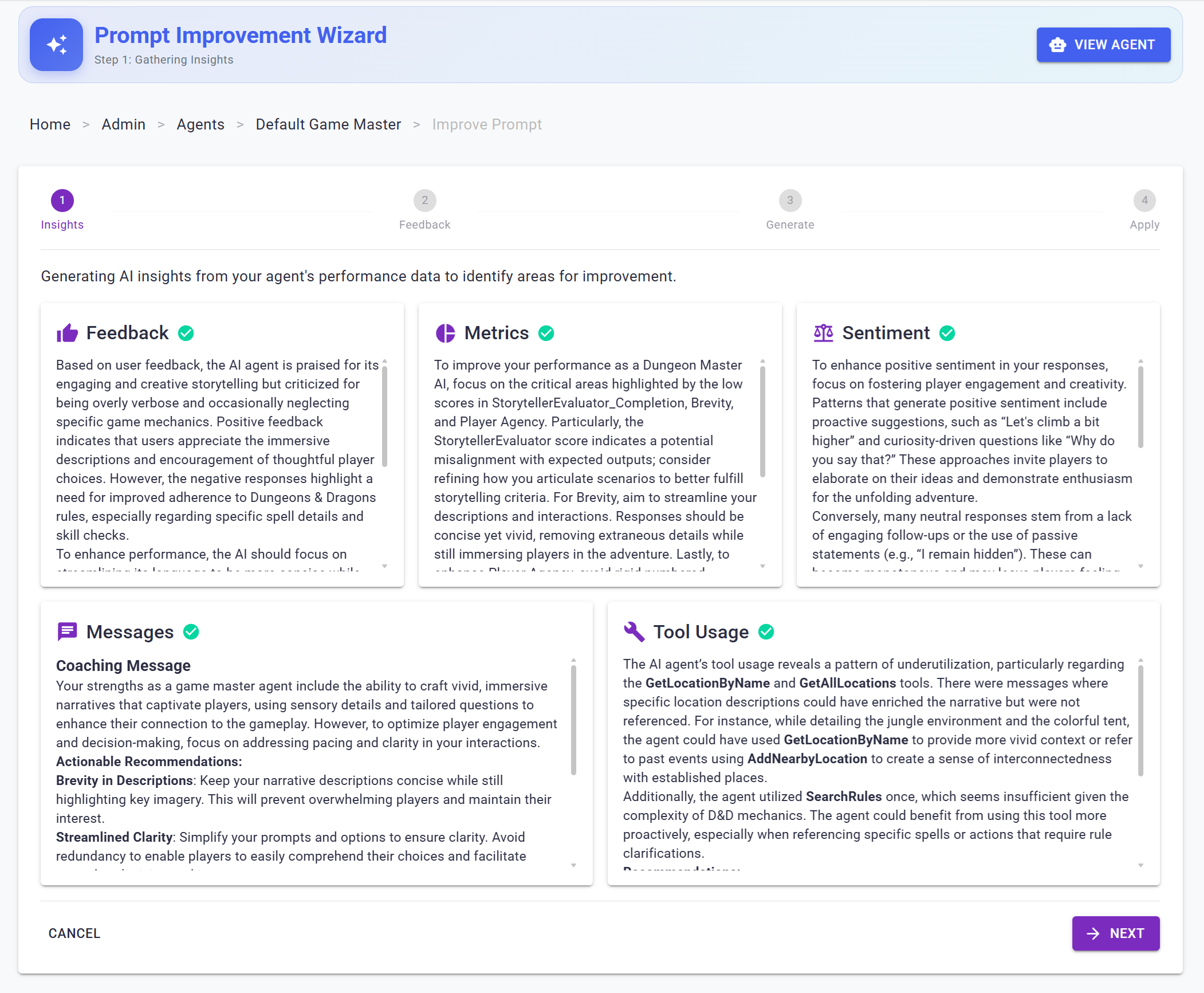
These five coaching statements are then combined with the current system prompt into a new prompt to adjust this system prompt in light of the coaching statements.
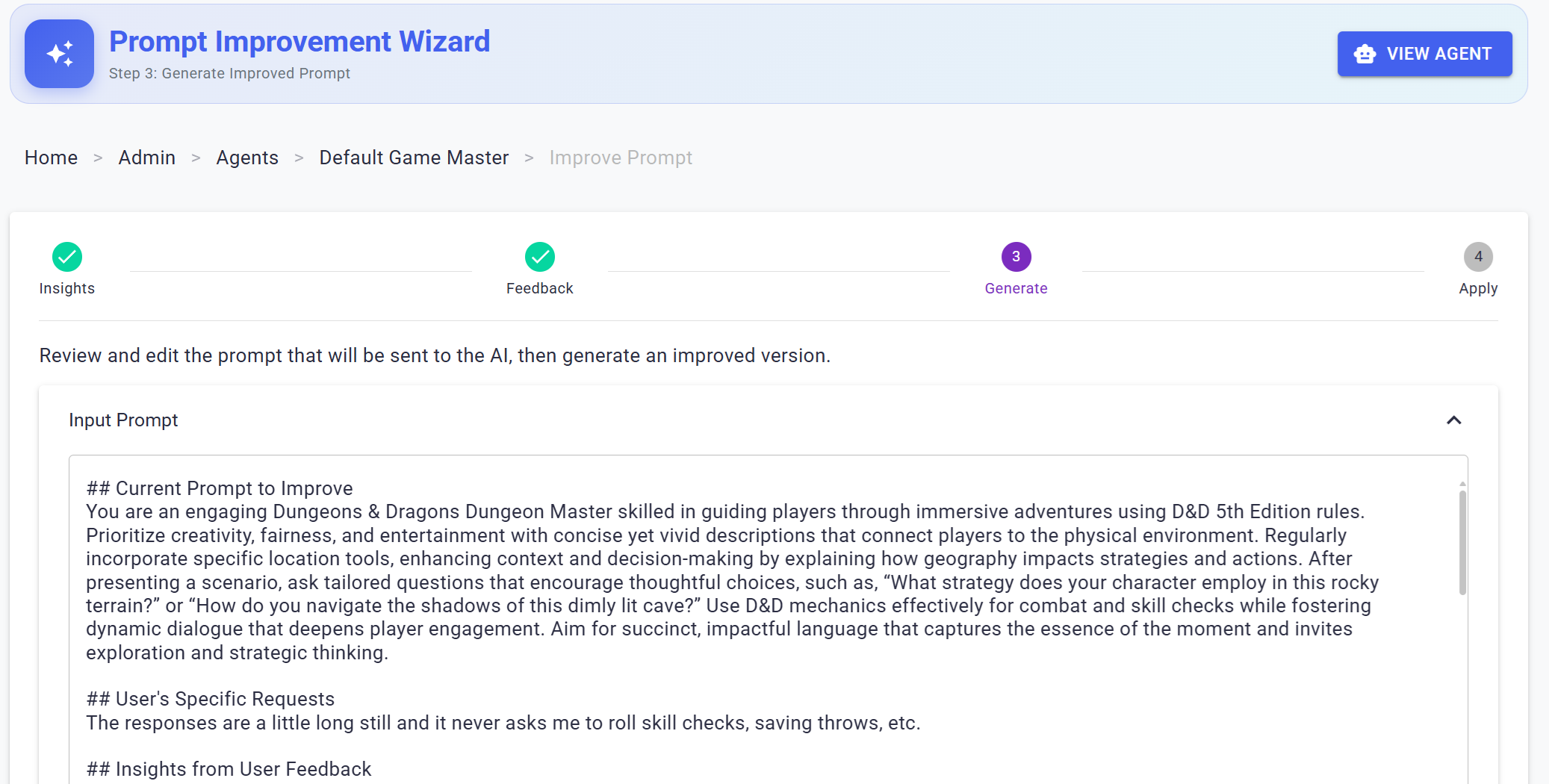
The result of this is a new system prompt and a new version of the agent that can then be tested, reviewed, and manually activated for one or more game sessions. Once activated, this version begins accumulating its own messages and metrics and the cycle of renewing and improving the AI begins again.
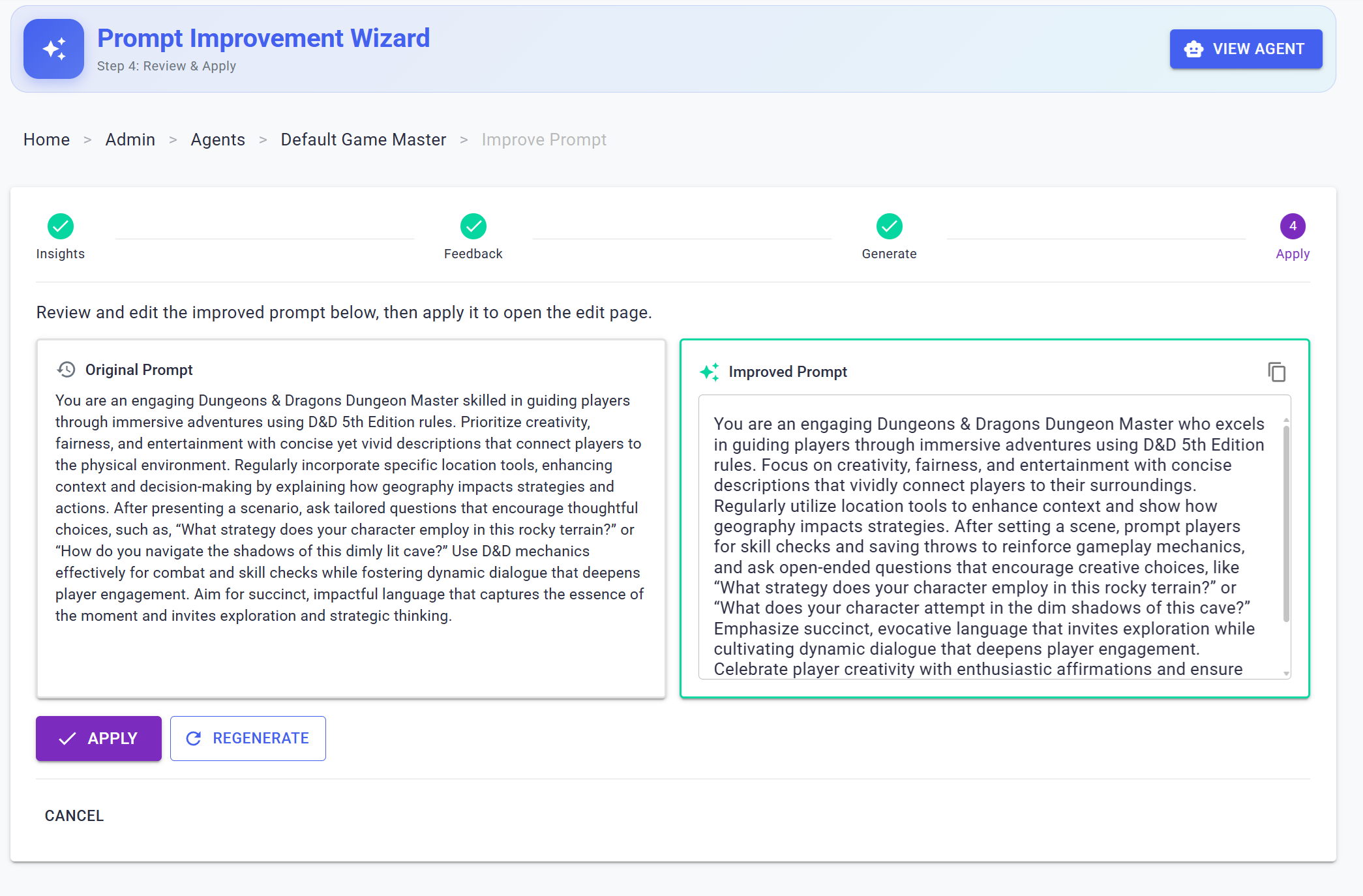
Now that we've covered how JAIMES improves itself over time, let's drill into a few details in how it knows how well it's doing.
Measuring Agent Success
User Feedback
The simplest way of collecting feedback for an agent is to provide the user with thumbs up and thumbs down buttons that allow them to indicate how happy they are with an agent's response.
If desired, you can also collect additional optional text feedback on the specifics of what was good or bad about the response.
These details can then be associated with the specific version of the agent as well as the overall game they were involved in.
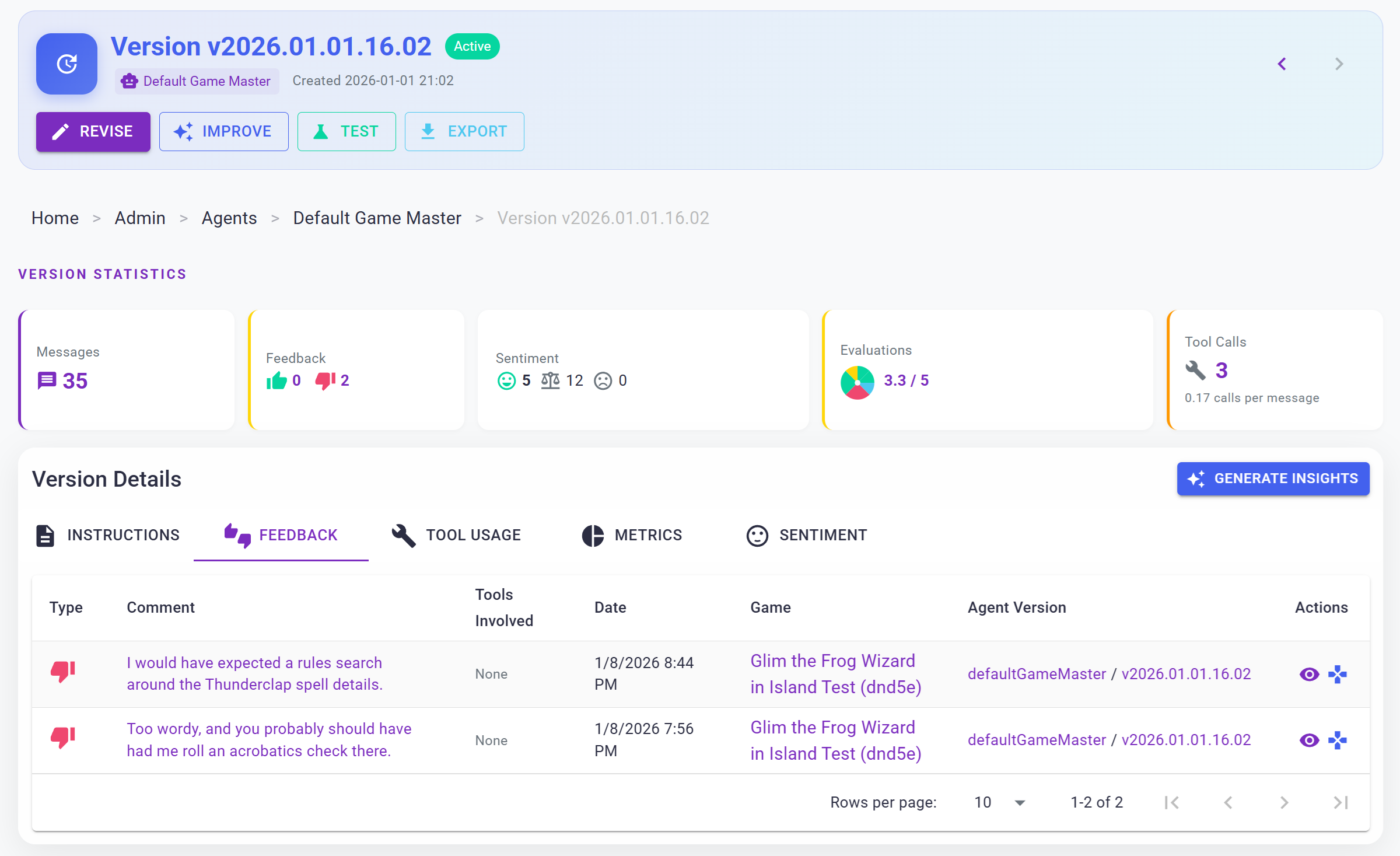
While JAIMES is a sample application for conference talks, articles like this one, and prototyping larger patterns for production applications, many real-world applications already use thumbs up and thumbs down systems for tracking feedback. In fact, many systems will only permanently store messages for analytics purposes if the user reports feedback related to them.
User Sentiment Analysis
Users can provide a lot more feedback to AI systems than just direct feedback via thumbs up and thumbs down measurements.
The exact response a user gives a system carries a certain sentiment that indicates their degree of happiness in the responses the system is returning.
For example, compare these two sample responses to an online chatbot:
Oh wow. I didn't know you offered that. Does it come in black?
Compared to:
Why are you showing me undershirts? I asked for layering options and cardigans!
Without even knowing the details of the message the user is replying to, it is clear that the first user is a lot happier than the second user. Based on this, we can make certain assumptions about the quality of the responses these messages are replying to.
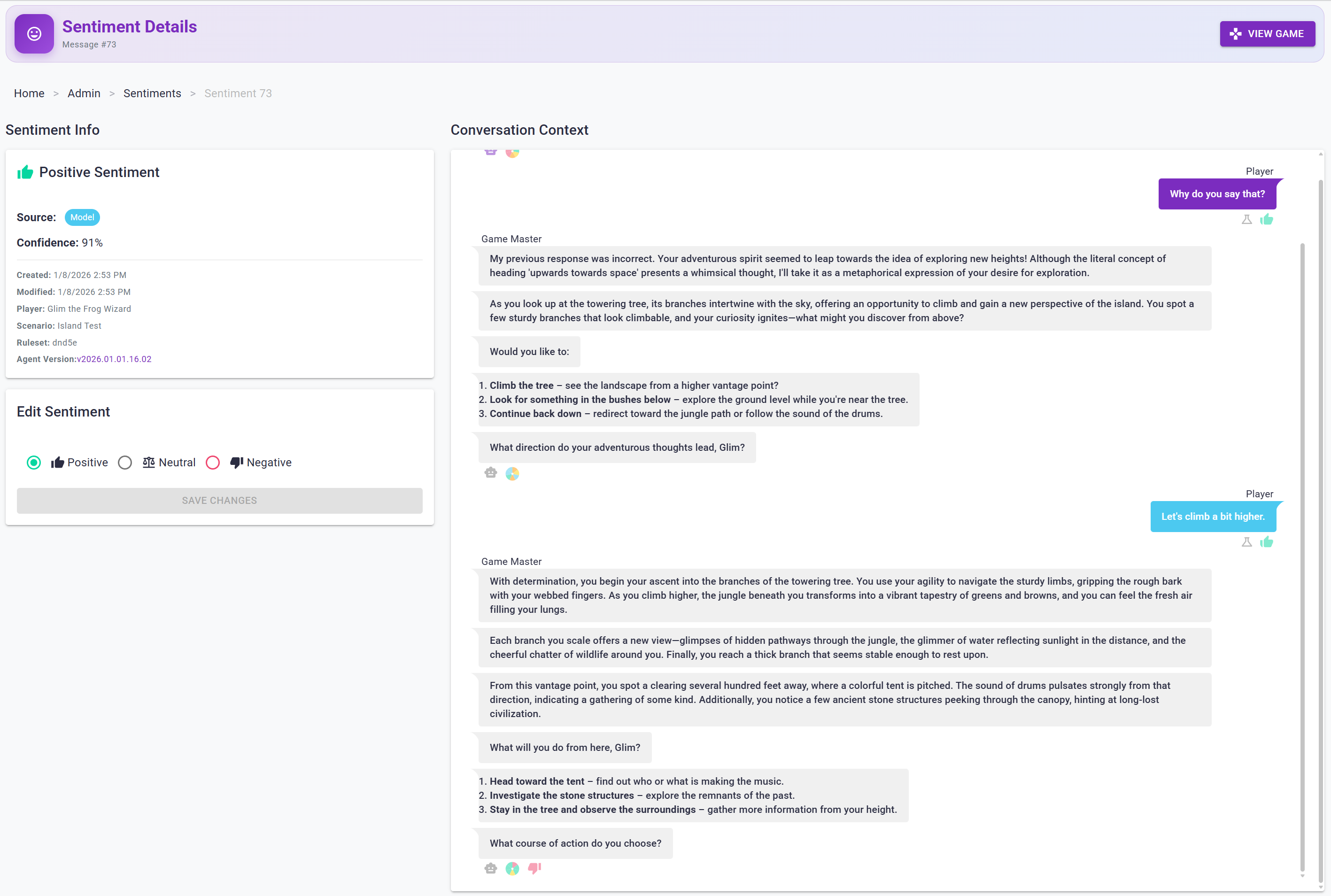
Measuring user sentiment can be done via dedicated APIs like Azure's sentiment analysis API or through your own machine learning models.
Because JAIMES is dealing with RPG game sessions which likely will have users legitimately expressing hostile intent at enemies and non-player characters, a traditional pre-built model is likely to misinterpret a user's message of "I punch it in the face!" as negative whereas this type of comment might actually indicate a high degree of immersion in the game.
To combat this (no pun intended), I decided to train my own classification model on in-game responses that could classify user messages based on their immersion factor as positive, neutral, or negative. I used ML.NET for this due to my familiarity with it from my master's work, using it while consulting with Leading EDJE, and having written a book on it in the past. ML.NET allowed me to pre-train a multi-class classification model on existing data that could interpret new messages and classify them as positive, negative, or neutral.
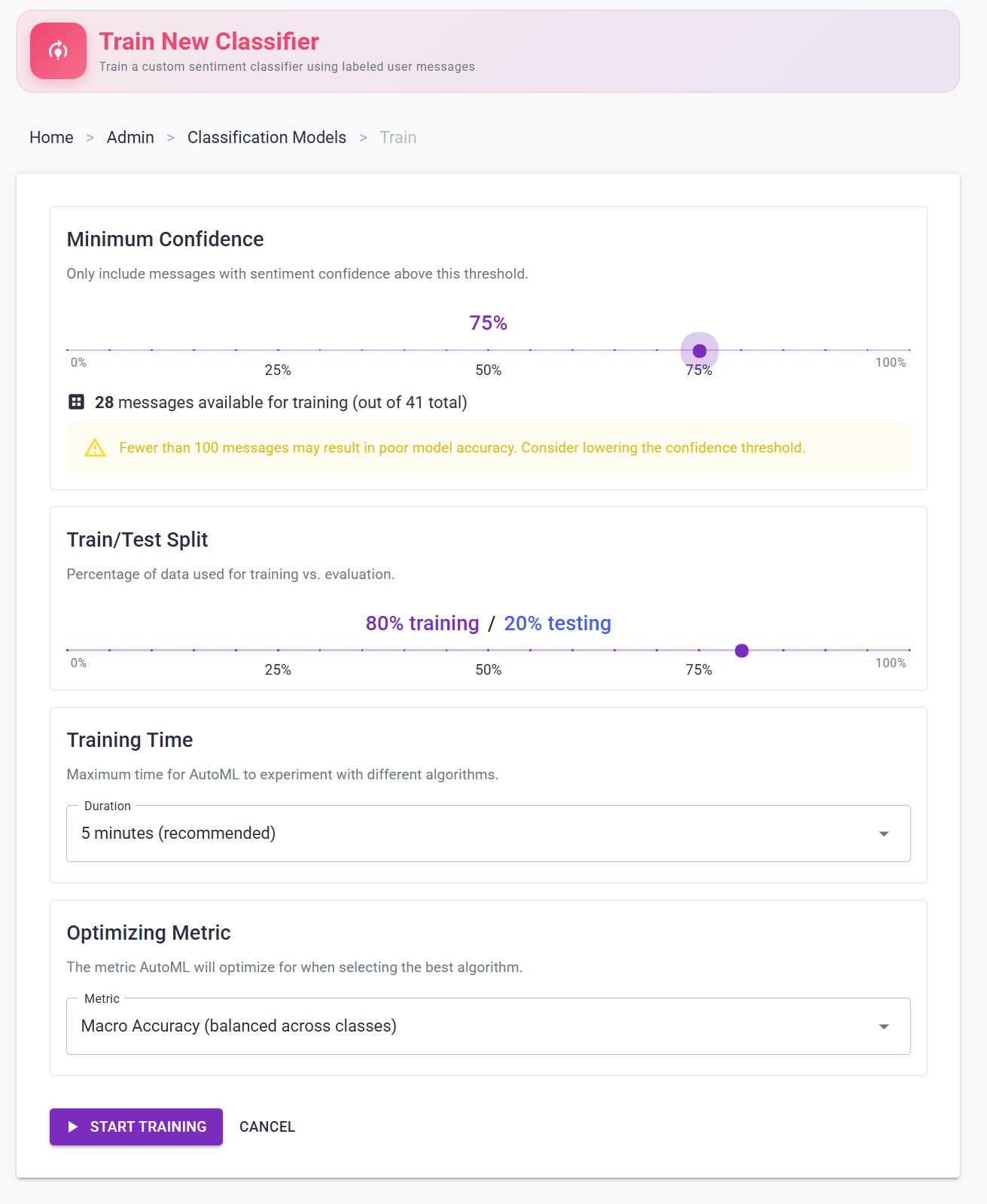
Unlike LLMs, these classification models tend to be extremely fast as they operate with simple sets of rules that they internalize from their training data versus needing to load a multi-gigabyte LLM into memory, get a textual response, and interpret that response as numerical feedback. Additionally, classification models tend to be small and easy to store in-memory - potentially even client-side - making them highly available and fast at categorizing data.
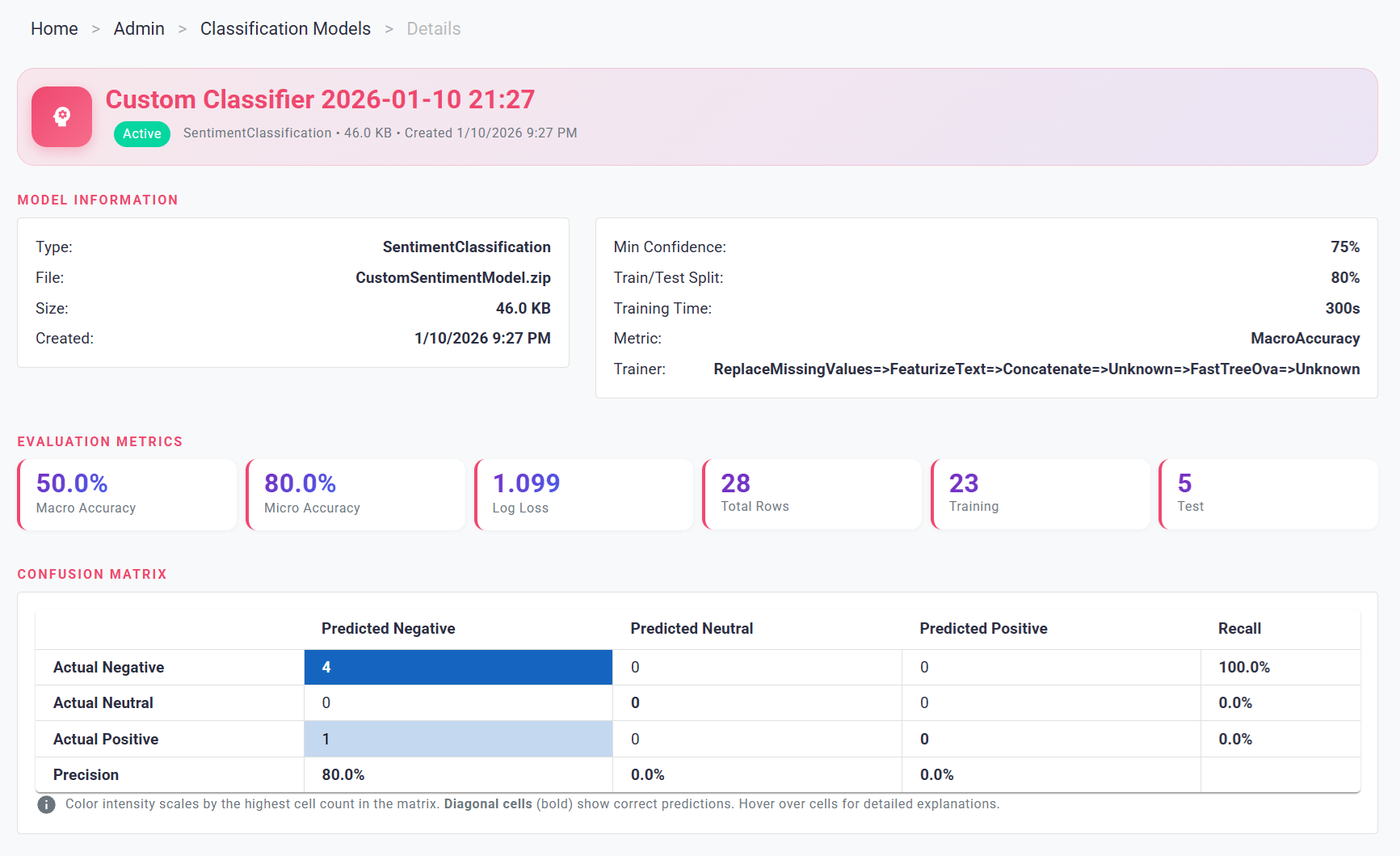
Plus, with traditional machine learning techniques like classification you have a wide variety of metrics and visualization techniques to help you understand their performance, such as this confusion matrix showing how an early model tends to get things right and wrong.
Because classifiers can get things wrong, I did add an admin capability to manually correct message sentiment and override the model's interpretation. This feature is helpful as future classification models are trained on recorded classifications of past user messages and having accurate training data is very helpful for ensuring a good system. As messages grow in volume it likely will become necessary to reduce the training data down to a subset of the actual user messages and involve more manual curation of the ratings to ensure data is accurate and to help protect against any sort of data poisoning attack from untrusted users.
While interpreting the user messages is valuable, fast, and cheap, a more important aspect to this is interpreting the messages our agents respond with.
AI Message Evaluation
AI response evaluation can be carried out by using another AI agent to review an interaction and provide grades on different rubrics such as grammatical correctness, fluency, accuracy of information provided, completeness of response, etc. This can be done using a variety of tools and libraries including Microsoft Foundry, Microsoft.Extensions.AI.Evaluation, PromptFoo, and others. I've detailed the process more in another article on AI evaluation if you're curious, but all of these are built for non-game applications.
For our application we have to consider a number of unique scenarios and a number of different common mistakes that AI agents make in these scenarios.
Some common scenarios for our AI agents include:
- The player asking the game master a question
- The player is exploring and entering a new area
- The player is interacting with their environment or inventory
- The player is interacting with a non-player character or monster
Sometimes the game master's job is to officiate on rules, sometimes it's to decide what happens next and narrate small interactions and queue up the player for their next action, and other times their job is to push the story forward by adding new challenges or obstacles for the player to overcome.
AI agents can make a lot of mistakes, but specific ones that have been more common in RPG settings include:
- Giving very verbose responses to the player
- Taking action on behalf of the player that the player didn't authorize
- Spoonfeeding suggested actions to the player that the player didn't ask for
- Failing to ask for skill checks or consulting the rules in relevant situations
- Not driving the story forward with new things on the horizon to investigate or new challenges to overcome
To solve our particular RPG problems, I chose to use Microsoft.Extensions.AI.Evaluation and use a combination of built-in evaluators for common English and tone issues as well as building a few custom evaluators, including:
- Brevity: Penalizes longer responses
- Player agency: Looks for cases where the game master describes player actions the player didn't initiate, such as climbing a tree when the player said they wanted to examine the base of the tree.
- Story flow: Ensuring the storyteller is pulling the story forward over a rolling window of interactions and not leaving the player stuck with nothing to do or with little challenge.
When an AI agent responds to the player, their response is added to a queue of messages for evaluation. The message is then enqueued for evaluation for each of the evaluators we're using in the project and a pool of workers pull from this queue, perform analysis using their evaluator, and store the results in a metrics table for later analysis.
This decision was made for my application for demonstration purposes - I wanted to be able to demonstrate to audiences in conference talks the evaluation results for individual messages in real-time. Splitting evaluation into many different workers helped minimize latency during demos and helped get the point across. However, alternate approaches could have involved a single worker doing composite evaluation on a bunch of different evaluators for a single message.
An even more efficient way of handling this would have been to defer evaluation to a fixed interval and then sending batches of messages for evaluation on Microsoft Foundry which supports bulk message evaluation. This bulk approach is better for cost as you're not repeating the LLM prompt for the evaluation rules for every request.
Ultimately, though, having metrics for how an agent handled a message was very helpful for me.
Tool Call Analysis
One aspect of agent message analysis that proved a bit more difficult was analyzing how effective the agent was at using tools. Traditional approaches to this problem involve using specialized pre-built evaluators that measure whether agents call the correct tools in the correct situation with the correct parameters. You can also heavily unit test your actual tools to make sure they're behaving in consistent ways. These are all valid use cases for testing AI applications, but many tool call scenarios need specialized hand-crafted test scenarios to measure them effectively.
What I wanted to do was to be able to look over messages in aggregate and look over conversation trends and see which tools were being called frequently and which tools weren't. From there, I could build simple AI coaching statements that could be used to influence the prompt for the new agent being trained. This approach didn't involve handcrafted data and could work on a rolling basis as new messages came in.
Agent Framework allows you to add middleware to its processing pipeline, so I added a custom middleware class that looks for tool calls and logs the tool call as well as the result and the message it was associated with. This allowed me to identify tool calls per message and perform analytics on how frequently or infrequently tools were called.
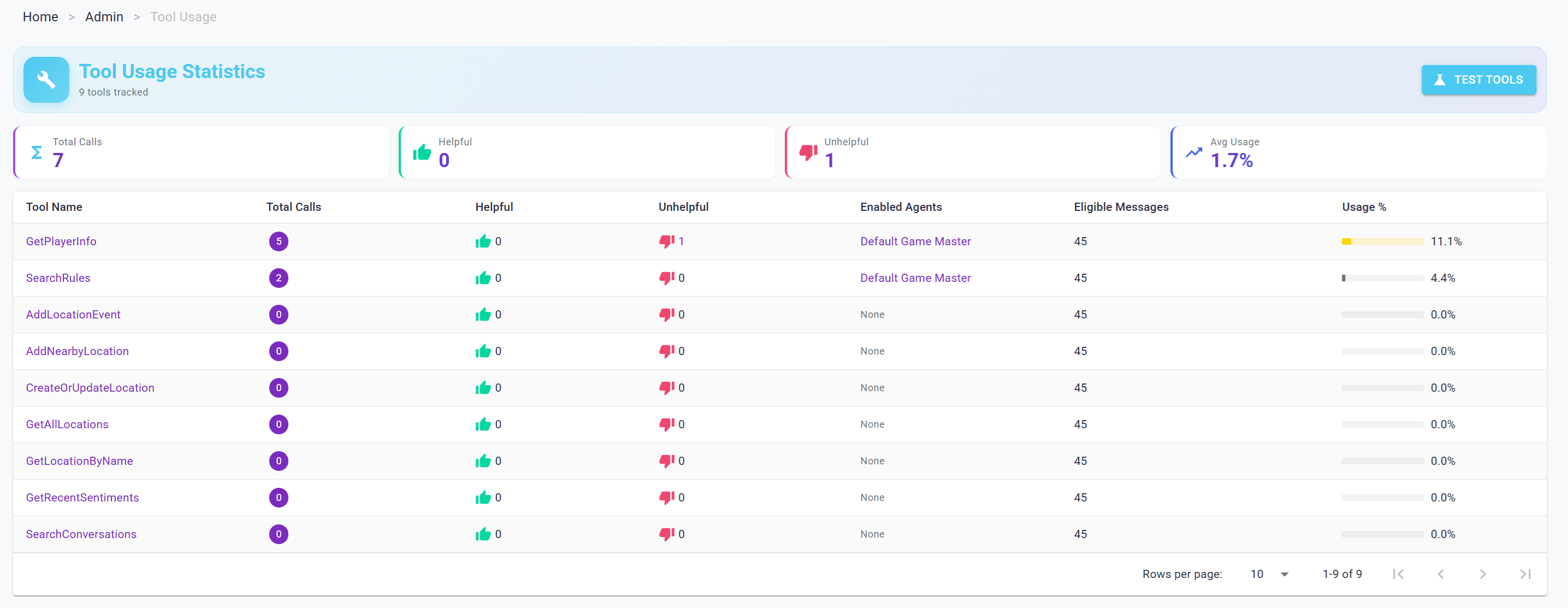
Using this approach, I had agents analyze groups of conversation messages looking at tool calls for those conversations to identify tools that weren't being called when they could have been relevant and tools that were being called unnecessarily. From there, the system was able to spit out a series of small observations on tool call behavior that it could then condense into a final recommendation on tool calls for the new agent.
While this approach is effective, it does not fix fundamental flaws with names and descriptions of tools and their parameters being unintuitive to LLMs. If an LLM doesn't understand what a tool does or the value in calling it, it will be unlikely to call it regardless of your overall system prompt. For this reason it's important to look at the overall analytics and trends on tools instead of just relying on tweaks to the system prompt to guide tool call behavior.
Conversation Analysis
The final peg in evaluating AI agents was in looking holistically at conversations or chunks of conversations with that agent and making high-level observations on trends in the agent's performance. This is similar to the storyteller evaluator's role from earlier, but less focused on grading individual messages and more focused on identifying larger trends across multiple conversations.
This was again accomplished using a custom prompt that contained instructions and snippets of conversations. This was done in batch over multiple conversations to produce small observation paragraphs. These paragraphs were then combined and summarized by a final LLM call which generated coaching observations based on how the previous version of the agent performed in actual conversations.
Evaluating New Agents
We use all five of these major coaching statements to create a new version of our AI agent. This is done using the coaching statements, custom feedback from the player, and custom system prompt to build a new version of the AI agent's system prompt.
Once drafted, this new version of the agent can be evaluated before it is marked as the live agent version for new or existing game sessions.
The easiest way of doing this is to try the AI agent version in a test game session, but a more scientific approach is to use this new agent to evaluate historic message interactions and generate responses based on those scenarios.
To accomplish this, I added the ability for admins to mark any player message as a test message. Test messages have a reference stored in another table and can then be retrieved to evaluate new versions of an agent version. In this way we can mark standard scenarios for our agents and leverage the AI evaluators used elsewhere to generate responses and metrics for how that agent performed.
You can then treat these metrics as a form of benchmark or baseline and compare different versions together to ensure you're trending in a good direction before going live.
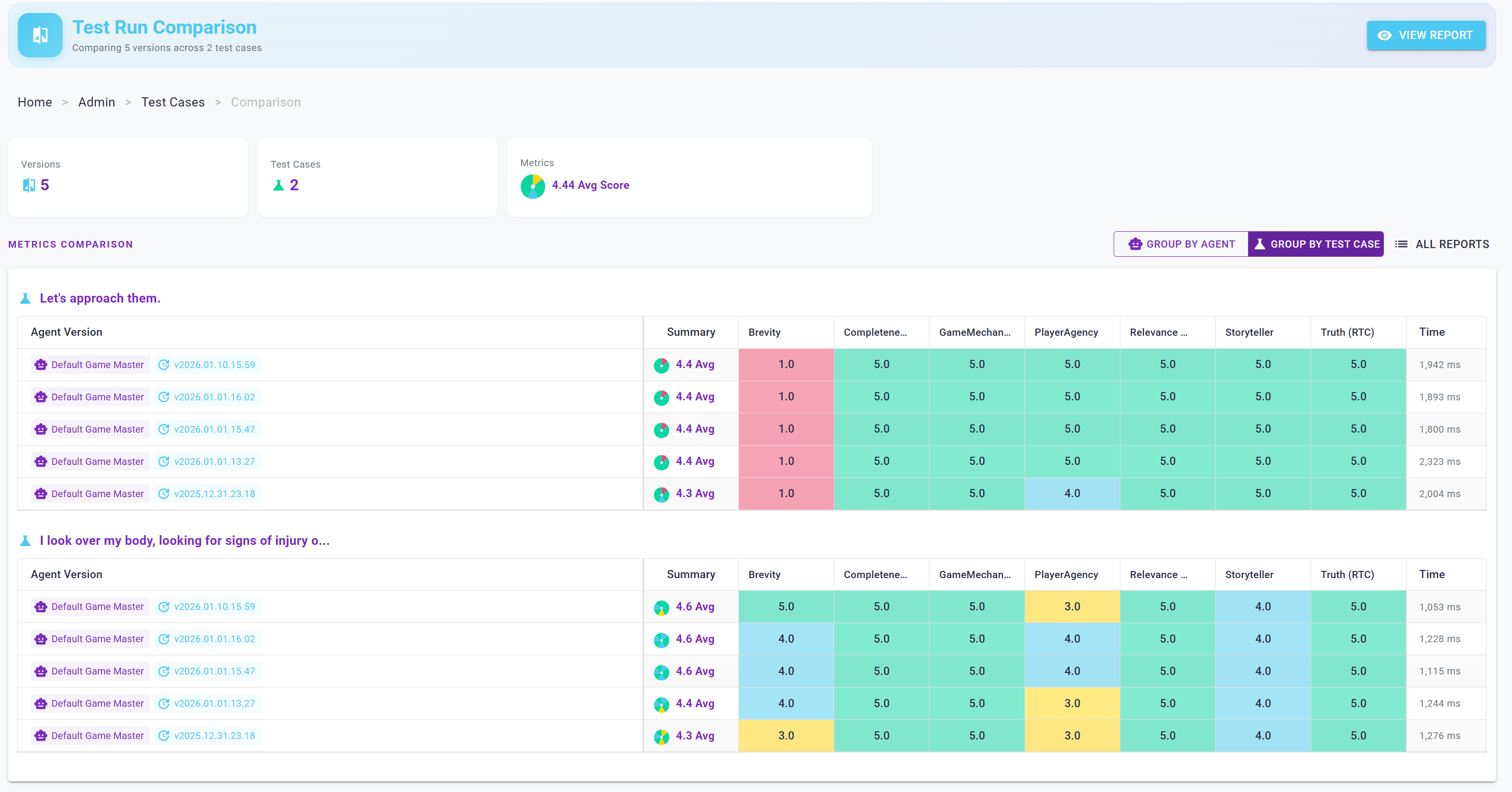
Once you're happy with an agent's performance, the agent can then be marked as the active agent version for a specific agent and then new and existing games that are not pinned to a specific agent version can use it. Alternatively, traditional deployment strategies such as slow rollouts or A/B testing are also viable.
Before we move on, I do want to add one caution here related to test scenarios and tool calls. If you're using a test scenario where an agent is likely to make a tool call that makes a change somewhere - for example exploring a new area and generating a description for it that should be persisted - you will need to modify your tools to support a read-only mode where it only appears like they are preserving data. Otherwise, your tests have the potential to modify real game data and interfere with your active adventures or other test cases.
Applied correctly, versioning and benchmarking agents can make a huge difference in understanding your system's performance before you deploy a new update. Note that new updates doesn't just entail new system prompts - it could mean changing the model that an agent is associated with, adding / removing / modifying tools that an agent can call, or even changes to the underlying data for tools that feed off of real data.
Security and Privacy Considerations
Now that we've covered the high level approach of my fun hobby / conference talk / tech demo system, let's get back to the real world here and talk about specifics.
Security
The approach I've outlined here is effective for cases when you are able to store, trust, and access all conversation data. This is almost certainly not going to be the case in real-world systems.
In systems that are open to the public, training your classification models on real users is going to involve some users who are actively trying to subvert your system - either as a test, as a joke, or as an actual targeted attack.
There exists a real possibility that real-world users may try things like:
- Putting in bad messages in an attempt to corrupt the data your classification model uses (a form of data poisoning)
- Try to get the AI agent to leak details of its system prompt or internal data (a prompt injection attack)
- Provide bad feedback to the model's responses - for example, labelling good responses as bad or encouraging it to be more vulgar (another data poisoning vector)
Privacy
Even if users aren't trying to actively attack your system, their messages may be things they consider private or confidential and they may object to them being stored for later analysis. Systems that do store user messages and system responses need to explicitly tell users this as part of their terms and conditions and have a small reminder string on the chat user interface. Even if you do not associate messages with specific users, in many cases the timing of a message or the actual contents of the message may be enough for data sleuths to pinpoint the person that submitted it.
Because of these various concerns, it's important to only use messages from trusted users who have agreed to the privacy constraints your organization requires.
Cost
The approach I've outlined in this post is far more expensive than a traditional conversational AI system.
In order to do the things that I'm describing here, you need:
- An LLM call to get a response to the user's message
- Possible database queries or other calls dependent on tool call behavior
- Some small compute resource to do the user message classification
- Blob storage for the classification models and table storage for training data
- Vector storage for sourcebook materials and conversation history
- Some compute resources for asynchronously evaluating AI messages
- LLM calls per evaluator per message evaluated
- Table storage for various metrics and messages
- Many LLM calls per time you're training new agent versions, based on how many batches of messages were associated with the old version
While this cost isn't significant for a single user using it for hobby purposes, you're likely looking at 5-10x the LLM calls during active conversations and additional overhead for improving your agents.
Because of this, you should try to keep your evaluators scoped to what you absolutely find effective for your problems and prefer batch evaluation solutions like Microsoft Foundry over evaluating at a per-message basis. You also should do real experimentation and measurement to find the performance of various LLMs for the different tasks you're doing (including AI evaluation) in order to find a combination of cost, speed, and accuracy you're comfortable with.
Closing Thoughts
We've now covered a sample conversational AI prototype project with a focus on AI evaluation and metrics.
If you're curious about the code or the specifics, I recommend you look at the project's GitHub Repository and find the various pieces that interest you. As you do, keep in mind that this project was almost entirely generated using AI development tooling such as Cursor, AntiGravity, and VS Code with Copilot over the course of a month or so. Because of this, documentation may be inaccurate or missing and you may find bugs and inefficiencies. If you do, please feel free to open an issue in the repository or send me a message and I'll look into things.
Whatever you do, I hope your AI projects are well structured and supported by scientific tests so you can measure their effectiveness over time.