How Context Impacts AI Agent Output
Improving quality via Agents.md, ADRs, and Repo-native Docs

Key Takeaways
- Context determines output quality:
context+model=output. Better context consistently outperforms expensive model upgrades. - Write a minimal
AGENTS.mdfile with process, commands, and testing expectations instead of upgrading to pricier models — "the best, simplest thing you could do." - Keep documentation inside your repository, not Confluence; AI agents find it via grep or vector search, not external tool calls.
AGENTS.mdbecomes part of every conversation — each request pays for those tokens, so keep it minimal and relevant.- Plan mode lets you use an Opus-tier model for design and shift to cheaper Sonnet for implementation — both faster and more cost-effective.
In this article we'll explore some ways you can improve the resiliency of your applications by improving the accuracy and overall quality of your experience using agentic AI development tools to build and modify software. While this series is all about this approach, this particular article focuses on Context - what goes in to the LLM to generate a response to the user and the things you can do to improve and control context.
Context is King
When we think about interactions with LLMs, there's a lot of different variables including models, tools, languages, and other things, but at the end of the day it all comes down to context and sending some inputs into an LLM and seeing some outputs (including potential edits and tool calls like terminal commands) come out of that agent.
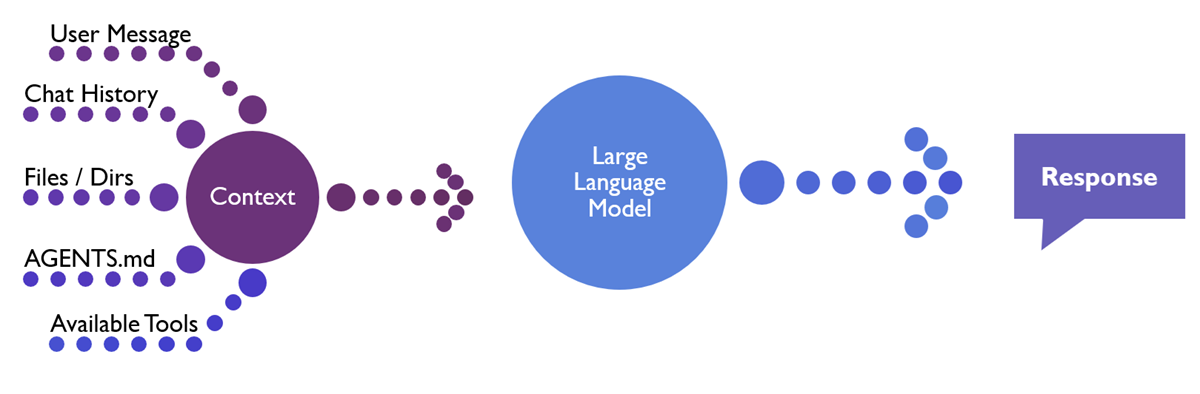
If you want to simplify it, you can boil it down to this equation: context + model = output.
While outputs can vary based on settings like temperature, at the end of the day you have an LLM that receives a message including conversation context and it outputs a response.
That response is going to be text that the user sees and it may also include some thinking - the model talking to itself to figure out what to do next - depending on your model. The response is also going to include actions such as patching lines in files, creating new files, running terminal commands to build / lint / expedite tasks, etc.
But ultimately the things that go into that response are going to include the user's message and the conversation history up to that point. If the user has a file open, that file may be included as well depending on your agent or the harness you're using and your settings or choices. You can also explicitly include files, directories, past chats, images, or other sources as additional context in your message.
If you have an AGENTS.md file or a CLAUDE.md file, that will come across for some tools since those files get included once per conversation. So they're always going to be present in that to help customize your agent.
Finally, the agent harness also sends a list of the available tools and descriptions that the model could potentially call, both natively and through Model Context Protocol (MCP) servers.
The first inclination that most folks have is to say, "Hey, let's use a better model. Instead of using auto (or another lower-tier default), I'm going to move up to Sonnet. Instead of Sonnet, I'm going to move up to Claude Opus and burn through my client's money or my monthly tokens allocations or my weekly tokens allocations" That can get you some mileage, but we're seeing organizations like GitHub starting to really clamp down on these higher-tier models and increase the prices of them, etc. So that is maybe not as sustainable of an option anymore.
Start with an AGENTS.md File
The best, simplest thing you could do is write a minimal AGENTS.md file that's going to be included in every conversation you have with an AI agent.
I like to include: the process we should follow, what the repository is about, and the exact commands to execute for building, testing, linting, etc. in my AGENTS.md file so the agent isn't flailing around trying different syntax approaches or behaving inconsistently.
If you have some testing expectations such as integration tests, unit tests, coverage percentages, libraries to use like Shouldly or Moq or whatever, put those in there as well.
If you are using languages in different ways than they're commonly used you might want to specify where your standards deviate. For example, if your organization avoids var for variable declarations, that's something you'd put in your AGENTS.md file.
I like to also give it some hints about where important things are such as documentation or a high-level directory structure. If there are other places the agent can check to retrieve additional context (such as Jira, Confluence, Linear, Azure DevOps, GitHub, etc.) list those places and the names of the tools to call to access them.
You don't want to make your AGENTS.md file too long because this becomes part of your conversation history and becomes tokens you pay for every request.
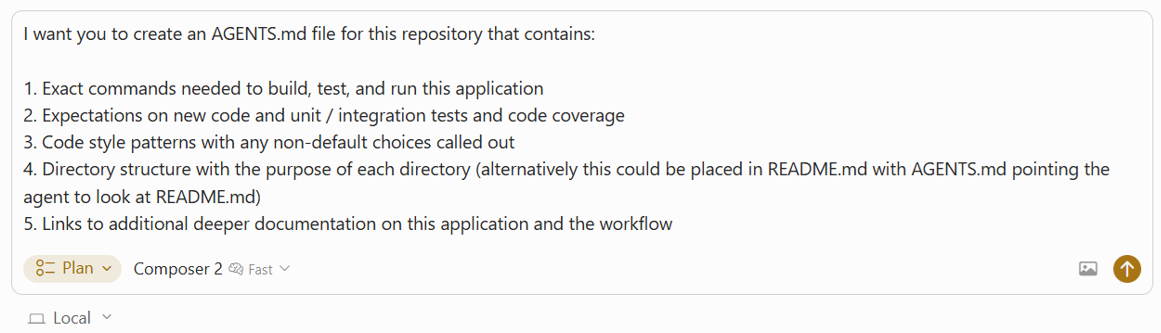
If you're not sure where to start, you can always start off by saying, "build this AGENTS.md file based on my repository." And that can be a nice way of going about getting started.
Keep Documentation Where AI Can Find It
Earlier I talked about putting things in the AGENTS.md file so agents see them every conversation. In addition to this I will usually link to important documents from my README.md file so both developers and agents can find them more readily.
I've noticed that a lot of agents will proactively look at that README.md file when beginning to plan, and having the link handy tells both humans and agents that these files exist and are good to look at.
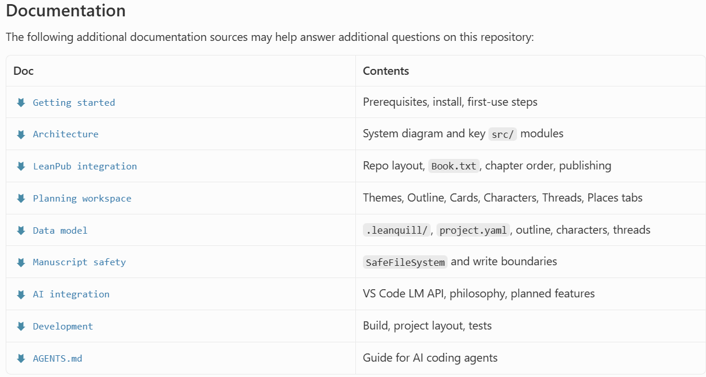
Some files you may want to list include:
- Architecture overview
- Coding standards
- Testing standards
- Getting Started / Environment Setup Guides
- Terminology References
- Troubleshooting Guides
- An index list of architectural decision records (ADRs)
The exact files you use will depend on how your team operates and the applications you build, but including links to important documents in your README.md helps developers and agents find these files and pull them in if they think they're relevant.
One of the reasons I'm a huge fan of the Cursor IDE is because Cursor uses a lot of indexing to power agentic search capabilities. Cursor uses embedding models and a vector database to go over your code and any local documentation, chunk it, generates embeddings for those chunks, and store them in that vector database. When Cursor goes and tries to find a concept such as what are our standards on access control, what do we do for validation, or where controllers live it might find results in code and it might find results in documentation.
By having your documentation included in your repository you're more likely to be able to provide good search results to your AI agents, reducing the amount of time and tokens they have to spend exploring your codebase and giving yourself more of an opportunity to explain your architecture and provide additional context.
I've been shifting more and more and more to having architectural decision records (ADRs) inside of the repository and then adding on to these as time goes on. So, as we implement new features, I might ask my AI agent, "Are there any ADRs that need to be updated or added?" and that way, we have this additional context that's getting created and maintained over time.
So, we have this knowledge. Now, the downside of this is that it makes it harder for folks who don't usually work in git to be able to see the documentation if it lives purely in source control, let alone edit it. This is something that we need to think through as an industry and figure out how do we get everybody involved while keeping documentation in a place that AI can find it more easily.
The reason why it's better to include documentation inside of code than inside of Confluence or something similar is because agents are more likely to try to find it with an indexed vector database result or a simple grep search versus remembering to make a tool call to check external documentation sources - even if you have provisions in your AGENTS.md file reminding the agent to check these external tools.
Another benefit is that documentation in the repository is versioned alongside the code, so you can track how guidance evolves over time and reduce drift between documentation and implementation.
I do like to think about documentation as potential energy that is not going to be converted into kinetic energy and included into every request unless it's really relevant, so just having documentation present doesn't impact your token usage.
Use Plan Mode Before You Build
One thing that I think is really really helpful for developers is instead of just using the default agent mode, you start with plan mode. Even if you're doing a bug fix, even if you're doing something simple, I like to say, "Hey, here's what I'm trying to do. Here's what's on the ticket. Implement this feature, add tests, and create or update relevant documentation".
The agent will generate a plan markdown file detailing what it wants to do, but will not make any modifications to files until I explicitly approve the plan.
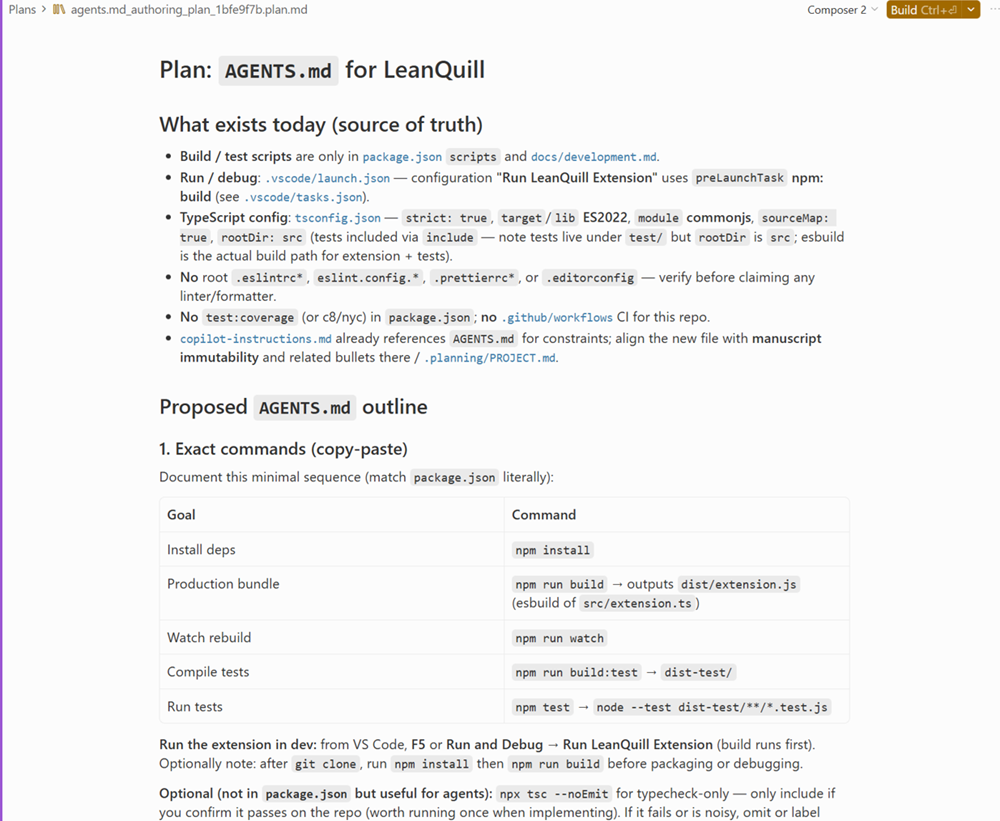
Plan mode is extremely helpful for me. It's sort of like working with a junior developer just joining the team: Tell me what you're going to do and then I'm going to have a conversation with you about your plan. It might generate something good and I'll look at it and then say "Oh, you're not going to add tests. Please add tests to your plan." or I might say "This is the fundamentally wrong approach. I want you to use X instead." and then it revises its plan file and I get to review it again before we commit to it trying to actually modify the file.
One nice thing about this is I can use an Opus model or something higher-end to generate my plan and then shift to a lower tier model like Sonnet to actually go off and implement it. Sort of like having your super senior engineer build up your design document and then handing it off to a lower level engineer to actually implement it, and this can be both cheaper and faster depending on your model choices.
Key Takeaways
While there's a lot of other things involved in building high-quality codebases using AI, being mindful of the various files and prompts going into your model will help you make more intelligent decisions around what to send the LLMs, how to structure your README.md files, where to put your documentation, and a number of other things.
Additionally, keep in mind that with most LLMs you're paying at a per-token level on input tokens (context) going in to the model as well as a different rate for output tokens coming out as part of your response. By constraining your conversations to only the essential and including just the relevant information for your task while letting the rest of the information live in supporting files that can be referenced as needed, you help document and manage complexity in your application while containing costs.
If you're curious about other things you can do to improve your application quality while using agentic AI development tools, check out the rest of the posts in this series or my other post on AI resources for senior engineers.
This article is adapted from a talk presented at Stir Trek. Watch the full presentation below: